




WhatsApp is introducing usernames. This article explains what is changing, what stays the same, and what (if anything) you need to do. The short version: everything you rely on today keeps working, and Trengo already supports usernames, so there is nothing you need to do.
At a glance
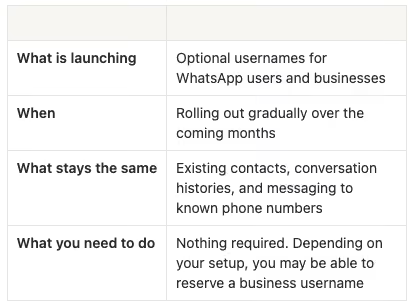
What is happening
Until now, every WhatsApp user has been identified by their phone number. WhatsApp is now introducing usernames, similar to how Instagram or X work, so people can choose how they show up on WhatsApp.
Usernames are optional, and people decide for themselves whether to share their phone number. We don't expect everyone to go username-only.
What stays the same
- Your existing contacts stay exactly as they are. You keep all the customer contacts you already have.
- Conversation histories stay intact. Even if a customer later enables a username and hides their phone number, we can still associate them with their existing contact record, as long as you have communicated with them before.
- Messaging to known numbers keeps working. If a customer shares their phone number with you, for example through a website form, you can continue sending WhatsApp template messages to that number exactly as you do today.
What changes
- Some new customers may reach out with a username only. New contacts on WhatsApp can choose to message your business without exposing their phone number.
- In those cases, Trengo shows the username instead of a phone number. When no phone number is available, the username becomes the main way you see that customer in your inbox.
Trengo is fully ready for this, so your inbox keeps working smoothly however your customers choose to reach out.
What this means for integrations and automations
If a customer reaches out with a username only, there is no phone number attached to that conversation yet. A couple of things depend on that phone number, so they are worth knowing about:
- Sidebar integrations: these match a customer to their records using a phone number or email, so they will not match automatically for a username-only contact.
- Journey triggers based on bookings or purchases: these rely on phone number logic coming from an integration. As more people move to username-only over time, these may cover fewer conversations.
The workaround: if you need a phone number, for example to track down an order for a new username-only contact, you can request it using a pre-added WhatsApp template in Trengo. If the customer accepts the invitation to share, their number is stored in the system automatically.
Can my business reserve a username already?
Usernames for businesses are rolling out gradually, so whether you can claim yours yet depends on how your WhatsApp setup works:
- If you use the WhatsApp Business app (Coexistence): you can already reserve your username directly on your phone. Make sure you have the latest version of the app, then go to Settings, Account, Username to pick yours.
- If you use the WhatsApp Business Platform (Cloud API): the username option is not available for your existing numbers yet. For now, it only appears when you add a new number. Existing numbers will get access as the rollout continues.
Frequently asked questions
Are usernames mandatory?
No. They are optional for both users and businesses. Customers can keep using their phone number if they prefer.
Will I lose the phone numbers I already have?
No. Any phone number you already have from a previous conversation stays available, and you can keep messaging that customer as usual.
What happens if a new customer messages me with only a username?
Their conversation arrives in your inbox with the username only. You can reply as normal. If you need their phone number, for example to look up an order, you can ask them for it in the chat.
When does this take effect?
WhatsApp is rolling usernames out gradually. Trengo already supports usernames across the inbox, so you are covered as adoption grows.

