




Integrating Shopify Customer Account with your AI Agent
With the Shopify Customer Account integration, your AI Agent can look up order details from Shopify and help customers with questions about their order, delivery, returns, and refunds.
In this article, we’ll show you how to create a Shopify app, give it the right permissions, request access to customer data, and connect it to Trengo.
Before you start
Before setting up the integration, make sure you have access to:
- The Shopify Developer Dashboard
- Shopify Partners
- Your Trengo account
You’ll also need to create a Shopify app and copy the following details from Shopify:
- Store name, for example
my-store.myshopify.com - Client ID
- Client Secret
Create a Shopify app
Follow the steps below to create your Shopify app.
- Go to the Shopify Developer Dashboard;
- Log in to your Shopify account;
- Click Create an app;
- Give the app a recognisable name, for example
Trengo AI Support; - Click Create.
After creating the app, you need to add the permissions Trengo needs to read order information from Shopify.
- Open the app you created in the Shopify Developer Dashboard;
- Go to the app’s configuration;
- Add the following Admin API access scopes:
read_assigned_fulfillment_orders
read_fulfillments
read_locations
read_merchant_managed_fulfillment_orders
read_orders
read_products
read_returns
read_third_party_fulfillment_orders
These permissions allow Trengo AI Agent to read order details, fulfilment information, returns, locations, and product information.
Release the app version
After adding the permissions, you need to release the app version. Without this step, the permissions won’t take effect.
- In the Shopify Developer Dashboard, open your app;
- Click Release or Create version;
- Publish the app configuration.
After releasing the app version, the app can be installed on your Shopify store.
Copy the Client ID and Client Secret
You’ll need the Client ID and Client Secret to connect Shopify to Trengo.
- In the Shopify Developer Dashboard, open your app;
- Go to Settings;
- Find the Client credentials section;
- Copy the following details:
- Client ID
- Client Secret
Make sure to store the Client Secret somewhere safe. Shopify may only show it once. If you lose it, you can regenerate it in Shopify and update it in Trengo.
Request access to protected customer data
Shopify requires extra approval before apps can access customer details such as names, email addresses, and addresses.
This access is needed so Trengo AI Agent can verify customers and provide order and delivery information.
- Go to Shopify Partners;
- Log in to your account;
- In the left menu, click App distribution;
- Click All apps;
- Select the app you created earlier;
- In the left menu, click API access requests;
- Click Request access for Protected customer data access.
Select customer data fields
When filling in the request, select Customer service as the reason for using protected customer data.
Select the following fields:
- Name
- Address
For each field, select Customer service as the reason.
These fields allow Trengo AI Agent to verify the customer’s email address and help with questions about shipping and delivery details.
Add data protection details
Shopify will ask you to describe how customer data is handled. You can use the example below:
Customer data, such as name, email address, and shipping address, is used by our AI-powered customer support assistant, Trengo, to look up orders, verify customer identity, and provide order status and delivery information. Data is processed in real time and is not stored beyond the support session.
Submit the request after completing the form.
Shopify will review your request. This can take a few business days.
Note: Until Shopify approves the request, customer name, email, and address fields may not be available for production stores.
Connect Shopify Customer Account in Trengo
After creating the app and requesting access to protected customer data, you can connect the integration in Trengo.
- Go to Trengo;
- Open the Shopify Customer Account integration setup for AI Agent;
- Fill in the following fields:
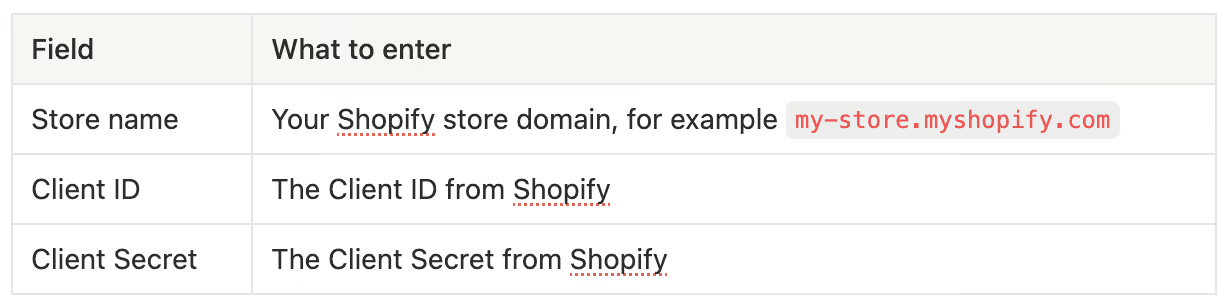
- Save the integration.
🎉 Your Shopify Customer Account integration is now connected to Trengo AI Agent.
What Trengo AI Agent can do with this integration
Once the integration is connected, Trengo AI Agent can help customers with questions about their Shopify orders.
It can look up:
- Orders by order number and customer email;
- Order status and order dates;
- Payment, refund, and outstanding amount information;
- Shipping address details;
- Fulfilment status;
- Carrier tracking numbers and tracking URLs;
- Return information;
- Product and line-item details.
Note: Shopify’s own hosted tracking page is not available for this integration. Trengo will show carrier tracking URLs instead, such as UPS or FedEx tracking links.

