




Geef je AI-agent instructies
In dit artikel wordt uitgelegd hoe je met behulp van de tabbladen ‘Gedrag’ en ‘Vaardigheden’ effectieve instructies voor je AI-agent kunt opstellen.
Duidelijke instructies zorgen ervoor dat uw AI-agent correct reageert, de juiste maatregelen neemt en indien nodig de zaak doorverwijst.
De drie onderwijsniveaus
Uw AI-agent werkt met drie instructielagen. Elke laag heeft een specifieke rol:
Laag 1 — Gedragsinstellingen
Hiermee bepaal je wie je AI-agent is. Dit geldt voor elk gesprek.
- Functieomschrijving
- Toon
- Bedrijfscontext
Laag 2 — Overdrachtscriteria en aanvullende instructies
Dit zijn je standaardregels. Ze zijn van toepassing wanneer er geen vaardigheid actief is.
Beschouw dit als je reserve-laag.
Laag 3 — Vaardigheden
Dit zijn procesgebonden instructies voor het omgaan met specifieke situaties.
Belangrijk: Vaardigheden hebben altijd voorrang op alle andere instructies.
Als er geen vaardigheid van toepassing is, wordt in plaats daarvan laag 2 gebruikt.
Gedrag: bepaal hoe je AI-agent werkt
Op het tabblad 'Gedrag' kun je instellen hoe je AI-agent standaard communiceert, beslissingen neemt en gesprekken voert.

Functieomschrijving
Bepaal de rol en verantwoordelijkheden van uw AI-agent.

Beste praktijken
- Geef duidelijk aan wat de AI-agent moet doen
- Beschrijf de belangrijkste taken duidelijk
Voorbeeld
"Klanten helpen bij vragen over bestellingen, retourzendingen en productinformatie."
Bedrijfscontext
Geef wat achtergrondinformatie over uw bedrijf.
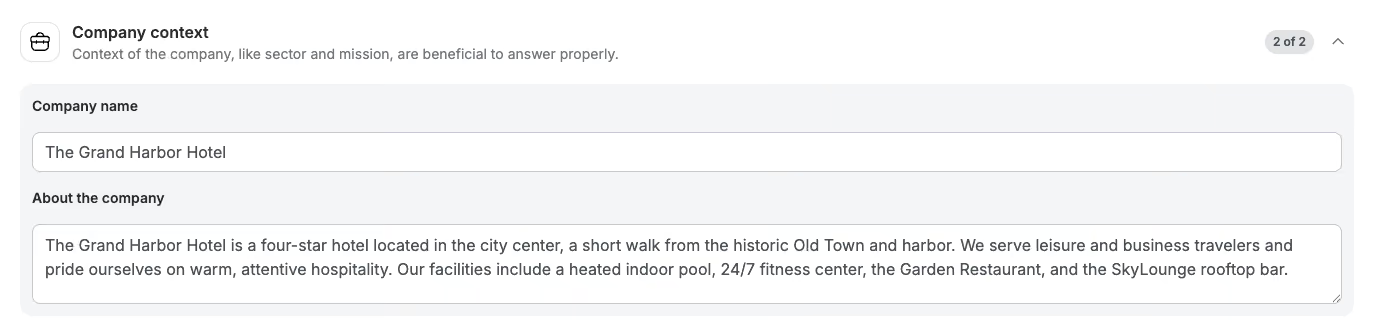
Vermeld:
- Wat uw bedrijf doet
- Wie uw klanten zijn
- Uw producten of diensten
Hierdoor kan de AI-agent relevantere antwoorden geven.
Toon
Bepaal hoe je AI-agent communiceert.

Beste praktijken
- Wees duidelijk (bijv. vriendelijk, professioneel, beknopt)
- Vermeld ook wat je moet vermijden
Voorbeeld
"Vriendelijk en behulpzaam, maar professioneel. Houd je antwoorden beknopt. Vermijd straattaal of al te informele taal."
Overdrachtscriteria
Overdrachtscriteria bepalen wanneer de AI-agent een gesprek moet doorgeven aan een medewerker.
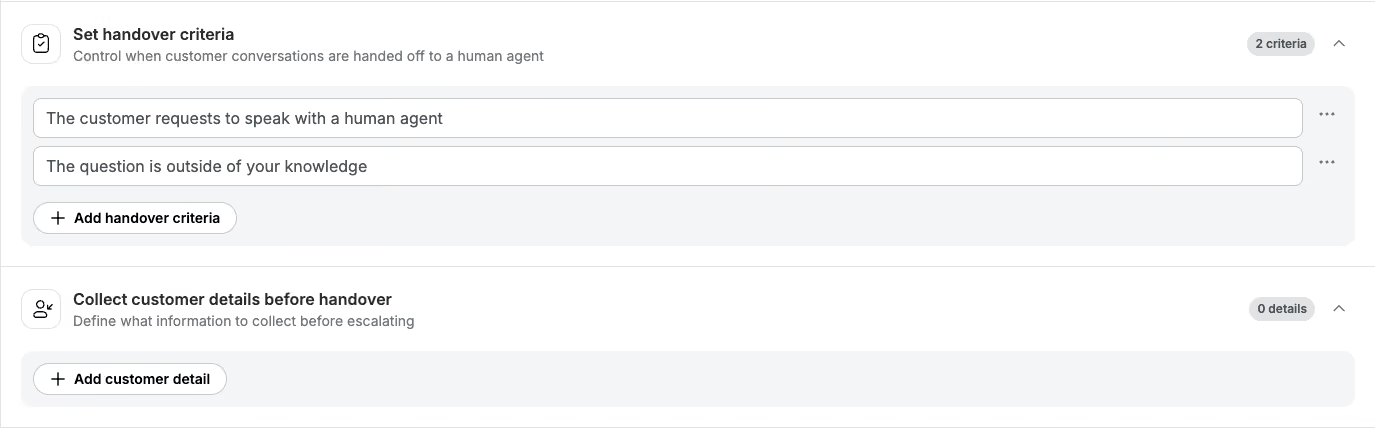
Standaard escaleert de AI-agent wanneer:
- Het kan de vraag niet beantwoorden
- De klant wil met een medewerker spreken
Je kunt extra regels toevoegen die voor alle gesprekken gelden.
Voorbeelden
- E-commerce: escaleren bij betalingsgeschillen of terugboekingen
- Horeca (THL): Meld veiligheidsproblemen of noodsituaties
Belangrijk: Als een vaardigheid escalatieregels definieert, heeft de vaardigheid voorrang.
Verzamel de gegevens van de klant voordat u het werk overdraagt
Bepaal welke informatie de AI-agent moet verzamelen voordat hij het overneemt.
De AI-agent vraagt alleen om ontbrekende informatie. Hij zal klanten niet vragen om hun antwoord te herhalen.
Voorbeelden
- E-commerce: ordernummer, e-mailadres, beschrijving van het probleem
- Horeca: boekingsnummer, naam van de gast, details van het verzoek
Zo beschikt uw team meteen over alle achtergrondinformatie.
Aanvullende instructies

Aanvullende instructies zijn permanente regels die op elk gesprek van toepassing zijn.
Gebruik ze voor algemene regels, niet voor stapsgewijze procedures.
Voorbeelden
- Spreek de klant altijd aan met zijn of haar voornaam
- Beloof nooit een terugbetaling zonder het ordernummer te controleren
- Praat niet over de prijzen van concurrenten
- Vraag altijd of ik je nog ergens mee kan helpen
Belangrijk: wanneer een vaardigheid actief is, heeft deze voorrang op aanvullende instructies.
Vaardigheden: specifieke situaties stap voor stap aanpakken
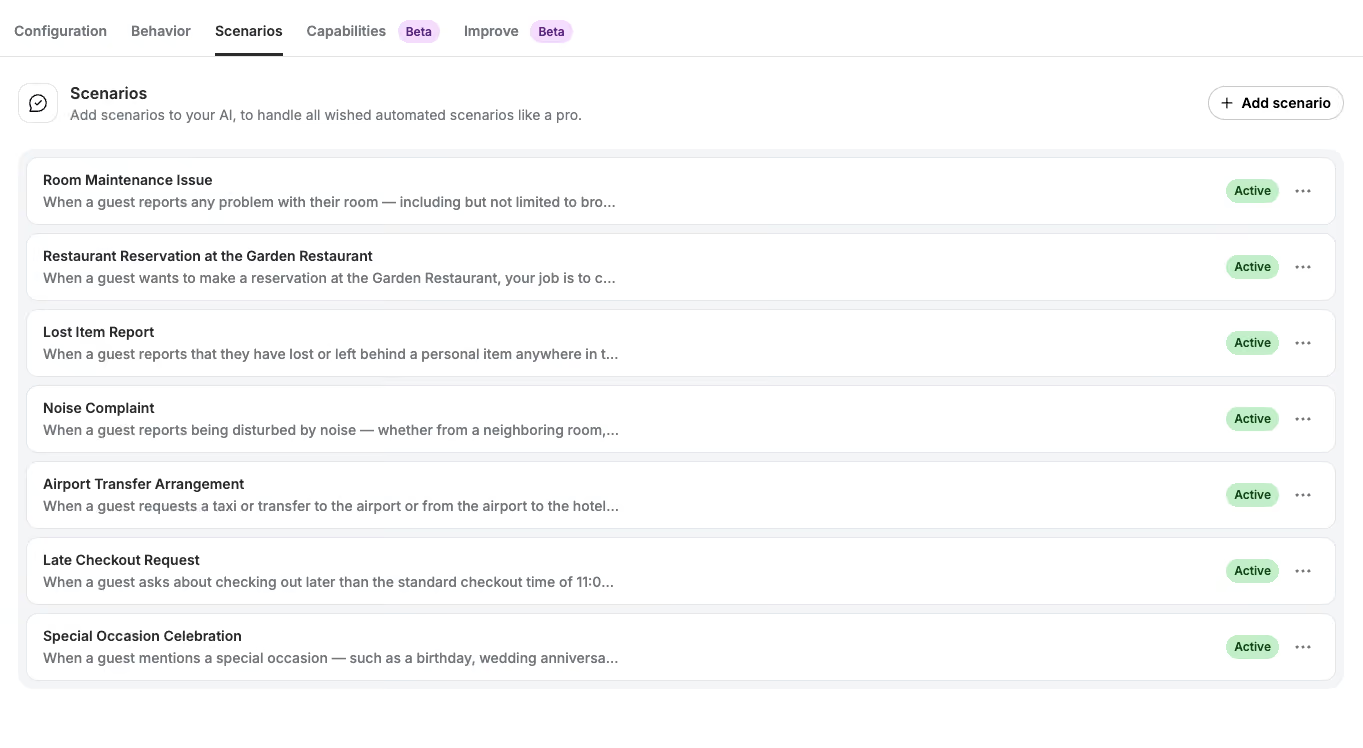
Vaardigheden bepalen hoe je AI-agent een specifiek proces van begin tot eind afhandelt.
Gebruik een vaardigheid wanneer:
- Er zijn duidelijke stappen die je moet volgen
- Er moet specifieke informatie worden verzameld
- Er moeten acties worden ondernomen (bijv. toewijzen, labelen, API-aanroep)
- Er is een vastgelegd escalatieproces
Tip:
Elke skill moet één volledig proces omvatten. Vermijd het combineren van meerdere use cases.
Voorbeelden van algemene vaardigheden
E-commerce
- Verzoek tot retournering of terugbetaling
- Beschadigd of verkeerd artikel
- Informatie over de bestelstatus
- Problemen met kortingscodes
- Betalingsgeschillen
Horeca (THL)
- Wijzigingen in de boeking
- Annuleringen
- Klachten van gasten
- Laat inchecken / uitchecken
- Reserveringen voor voorzieningen
Hoe schrijf je een goede vaardigheidsbeschrijving?
Een sterke vaardigheid omvat:
- Trigger — wanneer moet de vaardigheid worden geactiveerd?
- Stappen — wat moet er gebeuren, en in welke volgorde?
- Vereiste informatie — welke gegevens moeten worden verzameld?
- Acties — wat moet de AI-agent doen?
Wat de AI-agent in een skill kan doen
Binnen een vaardigheid kan je AI-agent acties uitvoeren in Trengo:
Toewijzen aan een team
"Wijs het gesprek toe aan @Returns Team."
Toewijzen aan een gebruiker
"Toewijzen aan @Sarah."
Labels aanbrengen
"Voeg het label @damaged-item toe."
"Voeg de labels @refund-requested en @high-priority toe."
Interne opmerkingen toevoegen
"Voeg een interne opmerking toe met het ordernummer, het probleem en de bevestiging dat de foto is ontvangen."
Gebruik integraties of aangepaste acties
"Zoek het product op via de Shopify Storefront en vermeld de prijs."
"Gebruik de actie 'Bestelstatus' om de bestelgegevens op te halen."
De AI-agent maakt alleen gebruik van integraties als daartoe opdracht wordt gegeven of als dit duidelijk is aangegeven in de actie-instellingen.
@vermeldingen gebruiken in Skills
Gebruik de @-knop om in te voegen:
- Teamleden (bijv. @Sarah)
- Teams (bijv. @Returns Team)
- Labels (bijv. @beschadigd-artikel)
Zo worden fouten voorkomen en blijft de consistentie gewaarborgd.
Praktijkvoorbeeld — beschadigd artikel (e-commerce)
Wanneer een klant een beschadigd artikel meldt:
- Bied je excuses aan en erken het probleem
- Vraag om een foto en een bestelnummer
- Controleer de schade na het bekijken van de afbeelding
- Voeg een interne opmerking toe met details
- Pas het label @damaged-item toe
- Toewijzen aan @Fulfillment Team
Praktijkvoorbeeld — annuleringsverzoek (horeca)
Wanneer een gast een annulering aanvraagt:
- Vraag naar het boekingsnummer en de reden
- Leg het annuleringsbeleid uit
- Voeg een interne opmerking toe met details
- Pas het label @cancellation-request toe
- Als het binnen 48 uur na het inchecken is, wijs het dan toe aan @Sarah
Belangrijke beperkingen
- Maximaal 10 vaardigheden per AI-agent
- Maximaal 5.000 tekens per vaardigheid
- Vaardigheden sluiten niet op elkaar aan en vormen geen aaneengesloten reeks
- De AI-agent ziet alleen het huidige gesprek
- Het weet niet bij welke Journey het hoort
Wanneer wat gebruiken
Gebruik het juiste type instructie voor de juiste situatie:
- Aanvullende instructies: regels die voor elk gesprek gelden
- Overdrachtscriteria: situaties die altijd moeten worden geëscaleerd
- Vaardigheden: gestructureerde processen met stappen en acties
Samenvatting
Om je AI-agent effectief instructies te geven:
- Gebruik het tabblad 'Gedrag' om de rol, de toon en algemene regels in te stellen
- Gebruik vaardigheden voor gestructureerde workflows en acties
- Gebruik de overdrachtscriteria en aanvullende instructies als reservevoorschriften
Belangrijkste conclusie: Vaardigheden hebben altijd voorrang. Hoe duidelijker je instructies zijn, hoe beter je AI-agent zal presteren.

